> ## Documentation Index
> Fetch the complete documentation index at: https://docs.tryassist.in/llms.txt
> Use this file to discover all available pages before exploring further.
# Gong
The Gong connector imports transcripts from calls recorded in Gong, indexing the call title, description, and full transcript content. New transcripts are automatically pulled in every 10 minutes.
## Setting Up
### Authorization
1. **Obtain API Credentials** You'll need an Access Key and Access Key Secret to pull in Gong transcripts.
2. **Open Company Settings** As an admin, click on **Company Settings** on the right side of the top navigation bar.
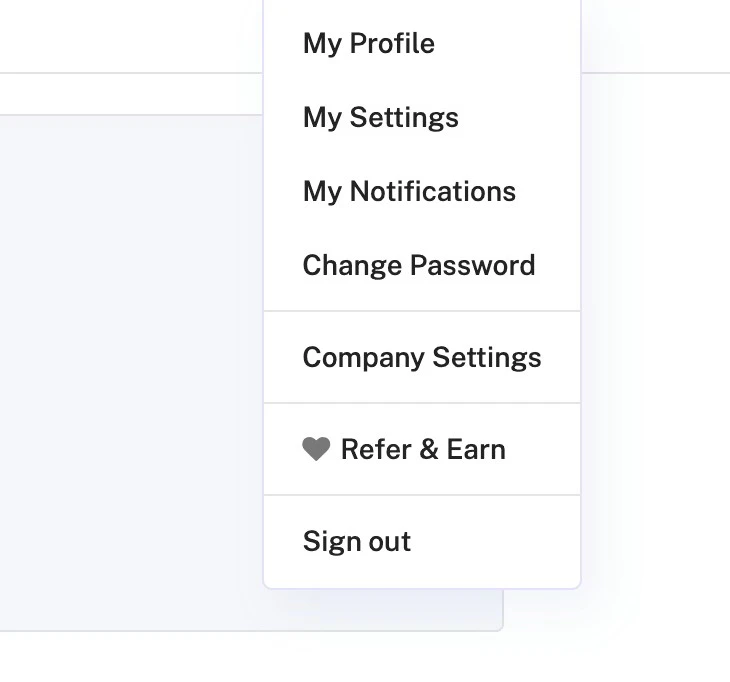 3. **Navigate to Ecosystem → API** Locate the **Ecosystem** section and select **API**.
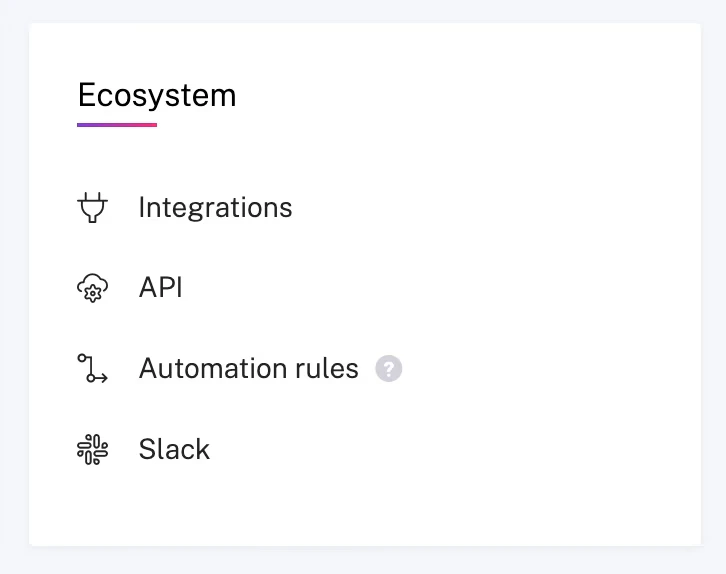 4. **Generate API Keys** Select **API Keys** (located next to **Integrations**), then click **Get API Key**. Note down your **Access Key** and **Access Key Secret** for use in the next steps.
## Indexing
1. **Open the Gong Connector** In the ASSIST AI interface, navigate to the **Admin Panel** and select the **Gong Connector**.
2. **Enter Your Credentials** Provide the Access Key and Access Key Secret obtained in the previous step.
3. **Select Workspaces** Specify the workspaces you'd like to index, or leave the field empty to index all available workspaces.
4. **Start Indexing** Click `Connect` to begin indexing your Gong call transcripts.
4. **Generate API Keys** Select **API Keys** (located next to **Integrations**), then click **Get API Key**. Note down your **Access Key** and **Access Key Secret** for use in the next steps.
## Indexing
1. **Open the Gong Connector** In the ASSIST AI interface, navigate to the **Admin Panel** and select the **Gong Connector**.
2. **Enter Your Credentials** Provide the Access Key and Access Key Secret obtained in the previous step.
3. **Select Workspaces** Specify the workspaces you'd like to index, or leave the field empty to index all available workspaces.
4. **Start Indexing** Click `Connect` to begin indexing your Gong call transcripts.